Mosaic Manufacturing’s Array platform brings automation and reliable throughput to orthotics production; helping labs achieve precise, repeatable outcomes while reducing manual effort. Ensuring consistently high performance from Array involves straightforward maintenance detailed in this document.
This guide outlines the day-to-day, weekly, and monthly care required to keep Array operating optimally in an orthotics production environment. It is intended to set realistic expectations for system upkeep, operator responsibilities, and long-term performance.
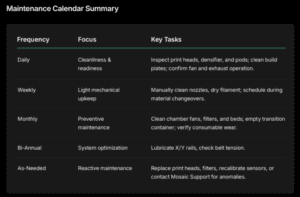
Best Practices
Operators are encouraged to:
- Treat maintenance as an integrated part of production flow.
- Schedule cleaning and calibration during material changeovers.
- Maintain consistent environmental conditions (20-25°C)
- Keep detailed maintenance logs for traceability and uptime
tracking.
Outcome
Following the schedules and responsibilities detailed in this table enables orthotics labs to:
- Maintain consistent print quality across batches.
- Reduce unscheduled downtime through proactive maintenance.
- Optimize cost-per-pair by extending component lifespan and minimizing rework.
Introduction & Safety Notices
Explanation of Array
system responsibility
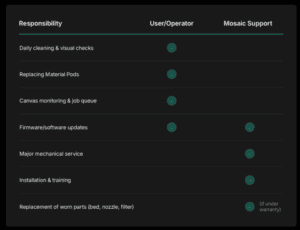
Array automates a significant portion of the orthotics manufacturing process; including automated bed changing, temperature control, and print queue management, but its success relies on routine maintenance and attentive operation. While many tasks are automated, users remain responsible for ensuring cleanliness, calibration, and component upkeep.
The operator should be trained to perform all listed maintenance routines and respond to alerts from Canvas or the Array touchscreen. Mosaic provides installation, initial training, and periodic service
support, but daily maintenance is the user’s responsibility.
Importance of upkeep and consistent operation
Maintaining consistent temperature environments, clean components, and updated firmware ensures accurate 3D prints and predictable orthotic quality. Neglecting regular cleaning or inspections may cause:
- Build plate adhesion issues
- Nozzle clogging or uneven extrusion
- Temperature drift and inconsistent print strength
- Unexpected downtime or print failures
Safety Notices
- Always power down Array before performing internal maintenance or cleaning.
- Avoid contact with hot-end and heated chamber components, these may exceed 400°C.
- Use gloves and safety eyewear when handling IPA or adhesives.
- Do not bypass safety interlocks or rear access panels during operation.
- Maintain clear ventilation for the exhaust and HEPA system at all times.

System Overview & Responsibilities
Array integrates four Element printers, one Gantry for automated bed changing, and a Storage Cart to house completed orthotic prints. The system also connects to Canvas software for job management, monitoring, and analytics.
Key Components
- Elements: Four independent printers, each with capacity for eight Material Pods.
- Gantry: Automated mechanism for print bed loading/unloading.
- Storage Cart: Collects printed orthotics and stores unused build plates.
- Material Pods: Contain Mosaic filaments (Aero, Form, etc.), easily replaceable.
- Software (Canvas): Used to manage print queues, monitor jobs, and record analytics.
What maintenance is user-responsible vs. Mosaic-supported
Operating the Array System
Powering on/off
procedures
- Turn the front power switch; the system will initialize for several minutes.
- Verify status lights and touchscreen indicators.
- Confirm that ventilation/exhaust is active.
System startup checks
- Check all four Elements have loaded Material Pods.
- Confirm Storage Cart is empty and correctly seated.
- Ensure Canvas connection is active and shows “Ready to Print”.
Routine Maintenance Tasks
Consistent maintenance ensures reliability and print quality.
Use the following schedule to organize routine tasks.
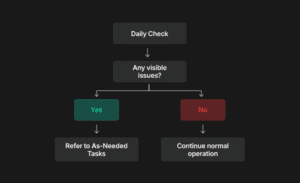
Before Every Print/
Daily Tasks
- Clean build plates with 90% IPA to remove adhesive or debris.
- Check nozzle tips for residue or blockage.
- Check Densifier for blockages/residue.
- Verify pod filament levels and replace if under 10%.
- Inspect Gantry path for dust or obstructions.
- Confirm chamber exhaust and internal fans are active.
Array Orthotics Maintenance Calendar
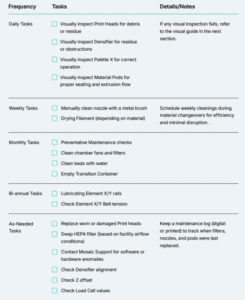
Maintenance Calendar View
Tips & Best Practices
Consistent maintenance not only preserves print quality but reinforces your lab’s reliability and turnaround time with clients.
- Schedule cleaning and calibration during material changeovers
- Avoid exceeding recommended idle durations to prevent moisture buildup in material pods
- Keep the environment temperature-controlled (20-25°C) for best print consistency.
- Document recurring issues and share them with Mosaic Support for faster troubleshooting.