Originally published January 31, 2020. Updated October 29, 2025 for accuracy and relevance.
When Palette 2 launched, it marked a major step in making multi-material 3D printing more accessible and connected. Building on the success of the original Palette, it introduced smarter splicing, simpler setup, and tighter printer integration through the CANVAS ecosystem. We’re sharing this post to highlight how Palette 2 and 2 Pro laid the groundwork for the automated material systems behind Element and Array today.
Just over three years ago, we launched our Kickstarter campaign for Palette, the first desktop product to bring quality multi-color 3D printing to the market. Then, in July 2017, we introduced Palette+, expanding the capabilities of the market’s printers to include high-quality multi-material printing for the first time.
Now, we’re further expanding the possibilities by launching our multi-material 3D printing ecosystem, which includes Palette 2, Palette 2 Pro, CANVAS Hub, and the CANVAS Multi-Material Software Platform.
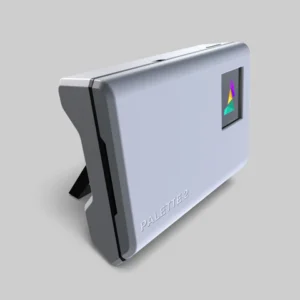
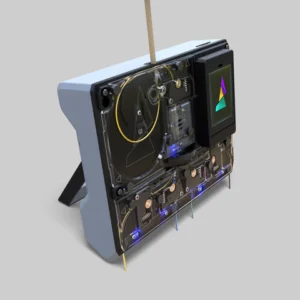
Palette 2: Elevate your 3D Printing Experience
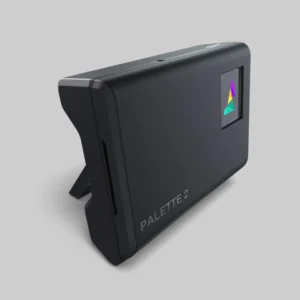
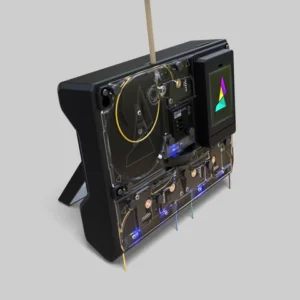
Palette 2 Pro: Multi-material 3D Printing for Professionals and Power Users
What’s new with Palette 2?
Simpler Setup
One of the most common pieces of feedback we receive regarding Palette+ is that it requires a lot of setup and tuning to get great results. So, with Palette 2, we’ve completely removed the initial calibration process and we’ve implemented learning algorithms into its firmware to enable improved print accuracy over time.
This simpler setup and ease of use also applies to the hardware and design of Palette 2. We’ve re-located the Scroll Wheel filament sensor and the buffer region to the inside of Palette 2, meaning you no longer need to place a sensor on the side of your printer. Overall, Palette 2 has a smaller footprint and its physical setup is significantly more flexible than that of its predecessor.
For quick setup, you can use the included stand to place Palette 2 on a surface beside your printer. For something more compact, you can use the included mounting plate to mount Palette 2 directly onto your 3D printer.
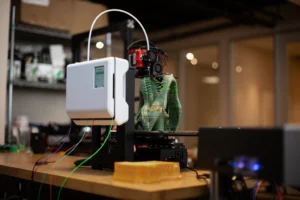
Palette 2 is powered by our new CANVAS platform, meaning your multi-material slicing experience is now a whole lot simpler.
These changes to the physical form, setup process, and software workflow mean that you can now get even better results from Mosaic’s Palette line of products.
More Reliable Printing
Palette and Palette+ operate as accessories. This means there is no communication between them and the printer they operate alongside. While this works well and allows both products to be universally compatible, it can be challenging to tune and optimize settings to achieve a high level of reliability for long and challenging prints.
In order to give you the best possible results, we’re introducing CANVAS Hub. CANVAS Hub ties Palette 2 to your 3D printer, allowing your machines to communicate with each other, and with our CANVAS multi-material software platform for printing via WiFi. This communication also means your Palette 2 stays in sync with your printer at all times.
CANVAS Hub has been developed with accessibility in mind, and we highly recommend it to any Palette 2 user looking to have the most reliable printing experience.
CANVAS Hub is available for pre-order alongside Palette 2.
Better Performance
Now that thousands of Palettes are in the wild, we’ve been able to take three years’ worth of user feedback and incorporate it into the designs of Palette 2 and Palette 2 Pro. With fundamental upgrades to many key areas of the system, the ease of use and reliability of the Palette 2 line make it a substantial improvement upon its predecessors.
Our new modular Splice Core uses our patent-pending solid-state splicing technology, which can heat ten times faster and use up to 30 times less energy than the hot tool in Palette+. The solid-state splicer not only leads to improved splicing reliability, but also allows for different types of filament to be more reliably used together in a single print.
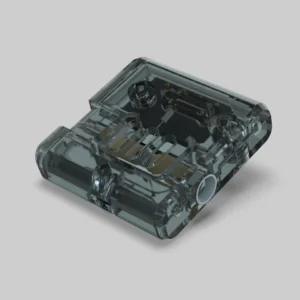
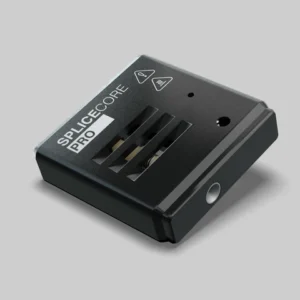
New modular Splice Core (top/left) & Splice Core Pro (bottom/right) with patent-pending Solid-State Splicing technology
Better Control & Simpler to Maintain
User interface and user experience were at the core of the Palette line’s redesign, so we made a number of changes to give you a more delightful experience.
We’ve included a new, colour touchscreen to allow users to interact with Palettes more easily. This screen gives you the ability to control all aspects of Palette 2 and monitor your print job as it progresses. You can even create gradient prints and activate several other print modes, right from the screen!
Palette 2’s flat, top-down design and use of transparent materials mean that you can see and easily access filament during 95% of its journey through the system. This, combined with the tool-less design, result in a system that is incredibly intuitive to use and maintain.
Runout Detection and Correction
One of the most highly-requested features over the past few years is the ability for Palette to splice the end of one spool of filament to the beginning of a second spool.
Palette and Palette+ never had the ability to sense when an input filament has run out, but Palette 2 can! Palette 2 features four filament sensors in its input drives; when these sensors detect a lack of filament, Palette 2 will automatically splice the end of one spool to the beginning of the next input.
Now, you’ll be able to run those long prints with no worries and use all those almost-empty-but-don’t-want-to-throw-out-the-rest spools you’ve been saving.
More Accessible
As we’ve evolved the Palette line of products, our design processes and manufacturing techniques have become more sophisticated. With these advances, we’ve been able to significantly improve the functionality, usability, and form factor of Palette 2—all while decreasing the price.
This increased accessibility will play a big part in our company’s mission of establishing multi-material 3D printing as the industry standard.
Palette 2 vs Palette 2 Pro
Palette 2 Pro has been optimized for professionals who tend to print with larger, faster 3D printers.
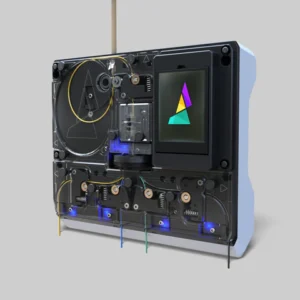
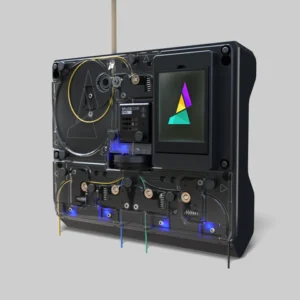
Palette 2 (left) and Palette 2 Pro (Right)
Palette 2 Pro features the all-metal, modular Splice Core Pro. Machined out of aircraft-grade aluminum, the Splice Core Pro was designed for ultimate durability and performance. Premium internal components with precisely tuned thermal characteristics allow the Splice Core Pro to heat up and cool down up to 20% faster than the Palette 2 Splice Core. The Splice Core Pro is only compatible with the Palette 2 Pro.
Generally, if your print bed is larger than 30cm (12”) in any dimension, plan to use Palette 2 for industrial purposes, or push very high printing speeds on your printer, we recommend that you upgrade to the Palette 2 Pro to prevent limiting your printing speeds.
Palette 2 Pro comes with an extended warranty of 12 months or 50,000 splices (whichever comes first), and a generous array of extra components to ensure minimized downtime. Palette 2 Pro also comes with an extra large teflon guide tube for use with larger printers.
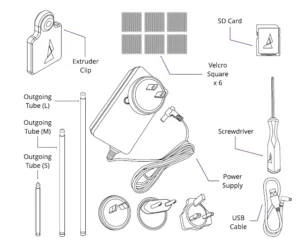
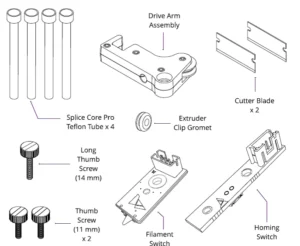
What's Included?
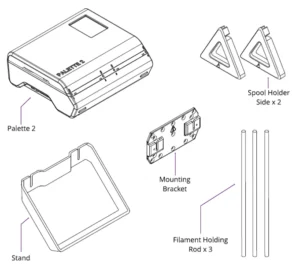
Palette 2 Contents
Simpler to use. More reliable. Easier to set up and control. High-value features. All at a more accessible price point.